We Generated 18 Images to Find the Best AI Image Model for Travel
TL;DR
After testing 18 images across 3 models, Nano Banana 2 (Google Gemini 3.1 Flash) scored 8.8/10 and was the clear winner for vintage travel photography. It costs ~$0.02/image, follows stylistic prompts faithfully, and handles Japanese text better than any competitor. MiniMax (5.9/10) has nice color science but ignores instructions. CogView-4 (3.6/10) produces cinematic images but can't do vintage.
We build AI-generated travel itineraries at tabiji — and recently, we started creating vintage-style travel photography for Instagram Reels. The concept: "POV: you just landed in Kyoto. It's 1972." AI-generated images styled to look like actual film photographs from the era.
To find the best model for this job, we ran the same prompts through three different AI image generators — Nano Banana 2 (Google's Gemini 3.1 Flash Image), MiniMax image-01, and Z.AI CogView-4 — across six iconic Kyoto landmarks. That's 18 images from the same prompts, giving us a direct, apples-to-apples comparison.
Here's what we found.
Why We Ran This Test
The AI image generation landscape in 2026 is crowded. Between GPT image generation from OpenAI (via GPT-4o and the newer gpt-oss-120b), Midjourney, DALL·E, Google's Gemini family (including Gemini 2.5 Flash, Gemini 3 Pro, and Nano Banana Pro), Grok's image capabilities, Claude Sonnet's emerging visual features, DeepSeek's multimodal models, Qwen-Image, GLM-based generators from Zhipu AI, and a growing open-source ecosystem — there are more options than ever for generating images with AI.
Most comparisons and benchmarks test generic prompts like "a cat wearing a hat" or "futuristic cityscape." That's fine for ranking visual quality on a leaderboard, but it doesn't tell you much about how these image generation models handle complex prompts with specific stylistic constraints — the kind of thing that matters when you're building a real-world content workflow.
Our test was deliberately narrow and demanding: generate photorealistic, high-fidelity images that look like authentic 1970s film photographs. This requires the AI model to understand film grain, Kodachrome color science, era-appropriate composition, period-correct clothing, accurate Japanese architecture and kanji text rendering, and the general "imperfect amateur snapshot" quality that separates a real vintage photo from a filtered Instagram post.
If a model can nail that, it can probably handle whatever you throw at it — from mockups and infographics to anime and social media content.
The Three Models
| Feature | Nano Banana 2 | MiniMax image-01 | CogView-4 |
|---|---|---|---|
| Provider | Google (Gemini) | MiniMax | Z.AI (Zhipu AI) |
| Model ID | gemini-3.1-flash-image-preview | image-01 | cogview-4-250304 |
| Max Resolution | High-resolution up to 4K | Up to 2K | 720×1440 (portrait) |
| Aspect Ratios | Flexible (via prompt) | 9:16, 16:9, 1:1, 4:3, 3:4 | 720×1440 portrait only |
| Cost per Image | ~$0.02 (input tokens + output tokens) | ~$0.04 | ~$0.02 |
| API Style | generate_content with IMAGE modality | POST /v1/image_generation | POST /images/generations |
| Latency | ~8–15 seconds | ~10–20 seconds | ~15–25 seconds |
| Architecture | Multimodal LLM (large language model) | Dedicated image model | Multimodal (GLM-based) |
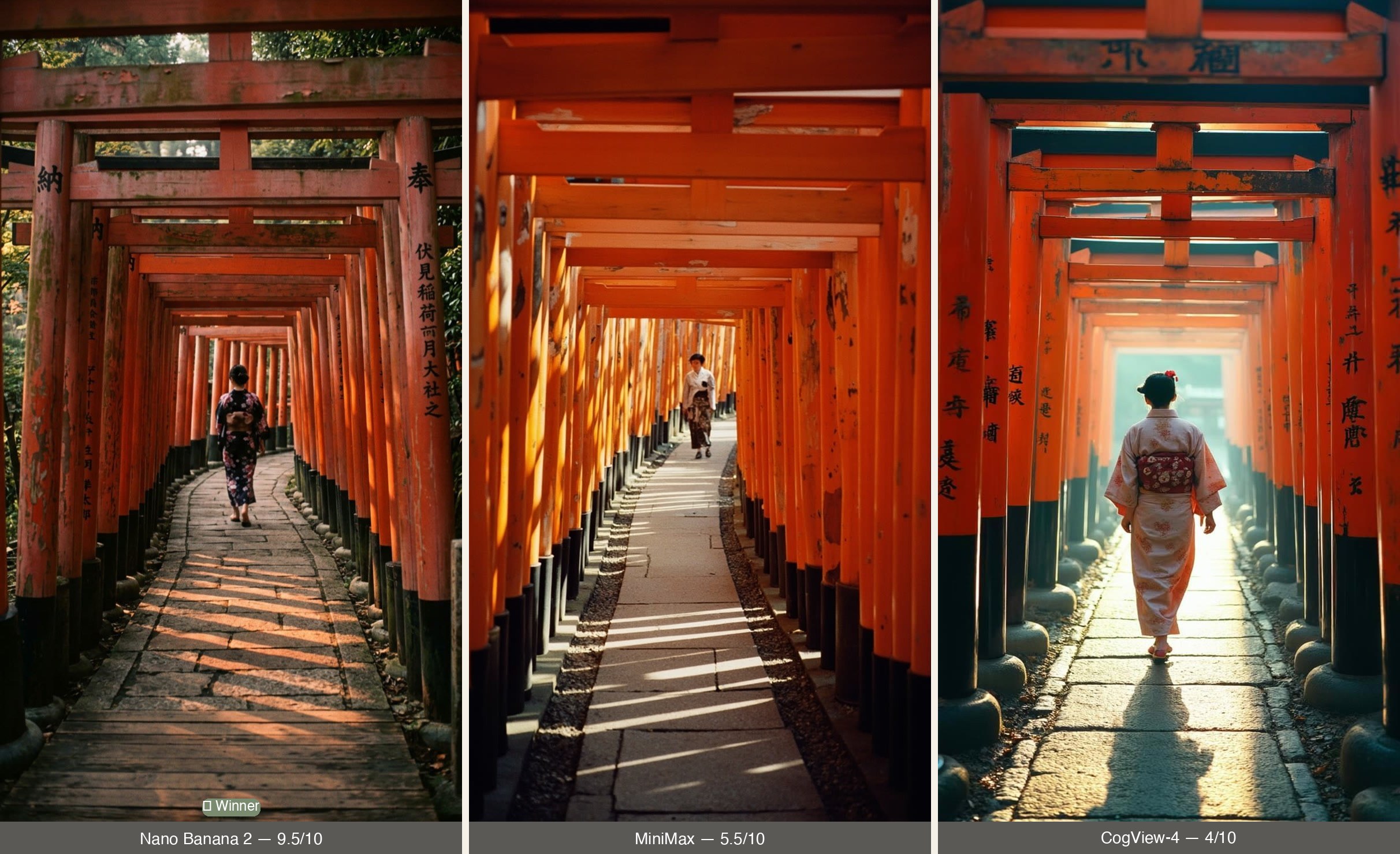
Test 1: Fushimi Inari Torii Gates
The prompt: A first-person POV photograph of a train arriving at a station platform, shot on Kodachrome film in the early 1970s. Vintage film grain, warm color cast, slightly faded — the kind of photo you'd find in a shoebox.
▶ Animated — Vintage POV Reel Clips
These clips show the same images after Remotion rendering — with film grain, vignette, and slow drift animation applied. This is what the final Instagram Reel looks like.
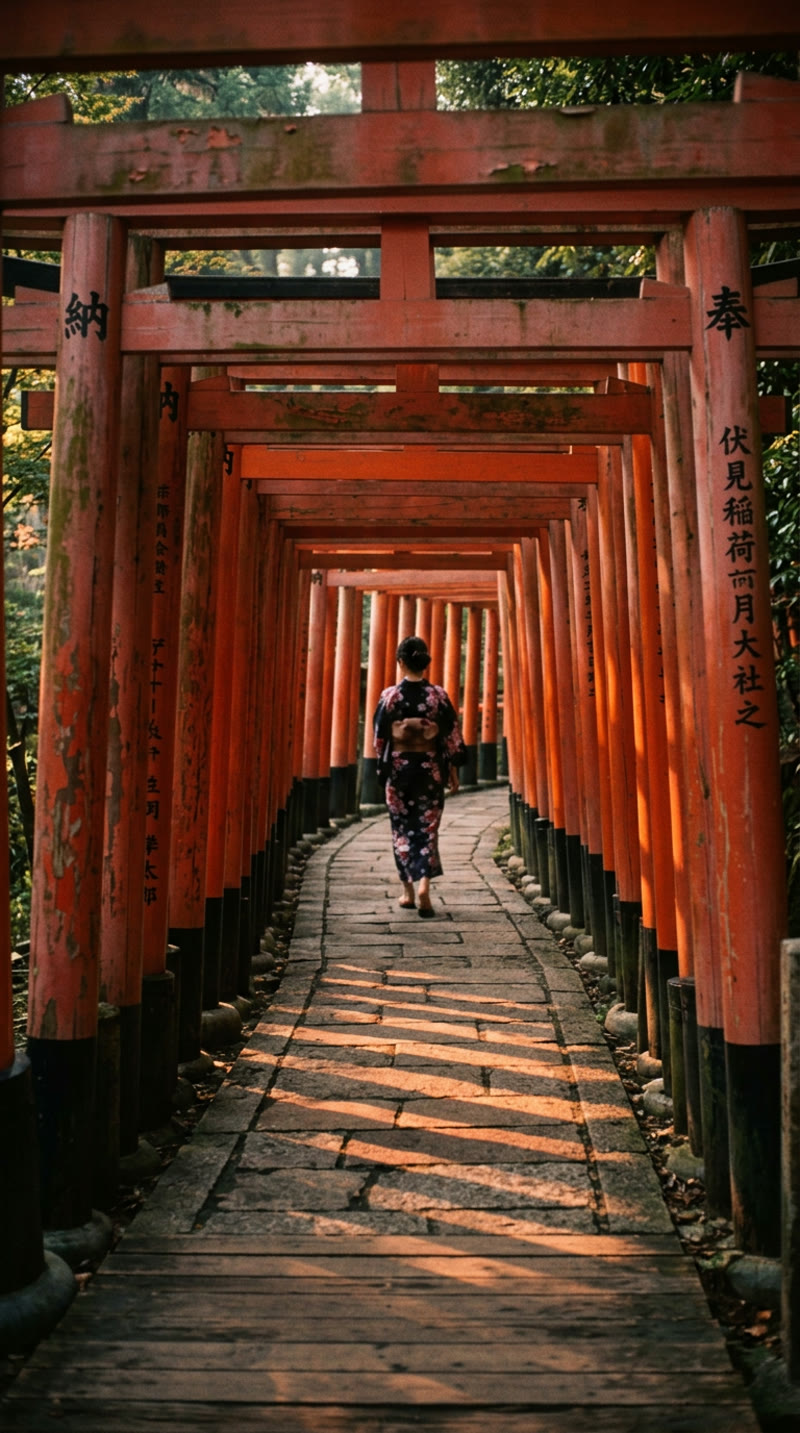
Nano Banana 2 — Winner
The clear standout. This image genuinely looks like a scanned Kodachrome slide. The torii gates have the right warm vermillion with slightly dusty, weathered tones. The kanji on the pillars is actually legible and correct — you can read "奉" and "納" (donation inscriptions authentic to Fushimi Inari). The composition is slightly asymmetric and candid, like a real tourist snapshot. The figure in a dark kimono at the one-third mark provides a natural focal point.
What's good: Best kanji accuracy of any model. Convincing wood patina and weathering. Natural composition. Correct architectural proportions.
What's not: The image is slightly too sharp and clean for genuine 1970s film — more like a "good" VSCO filter than real Kodachrome. Film grain is minimal.
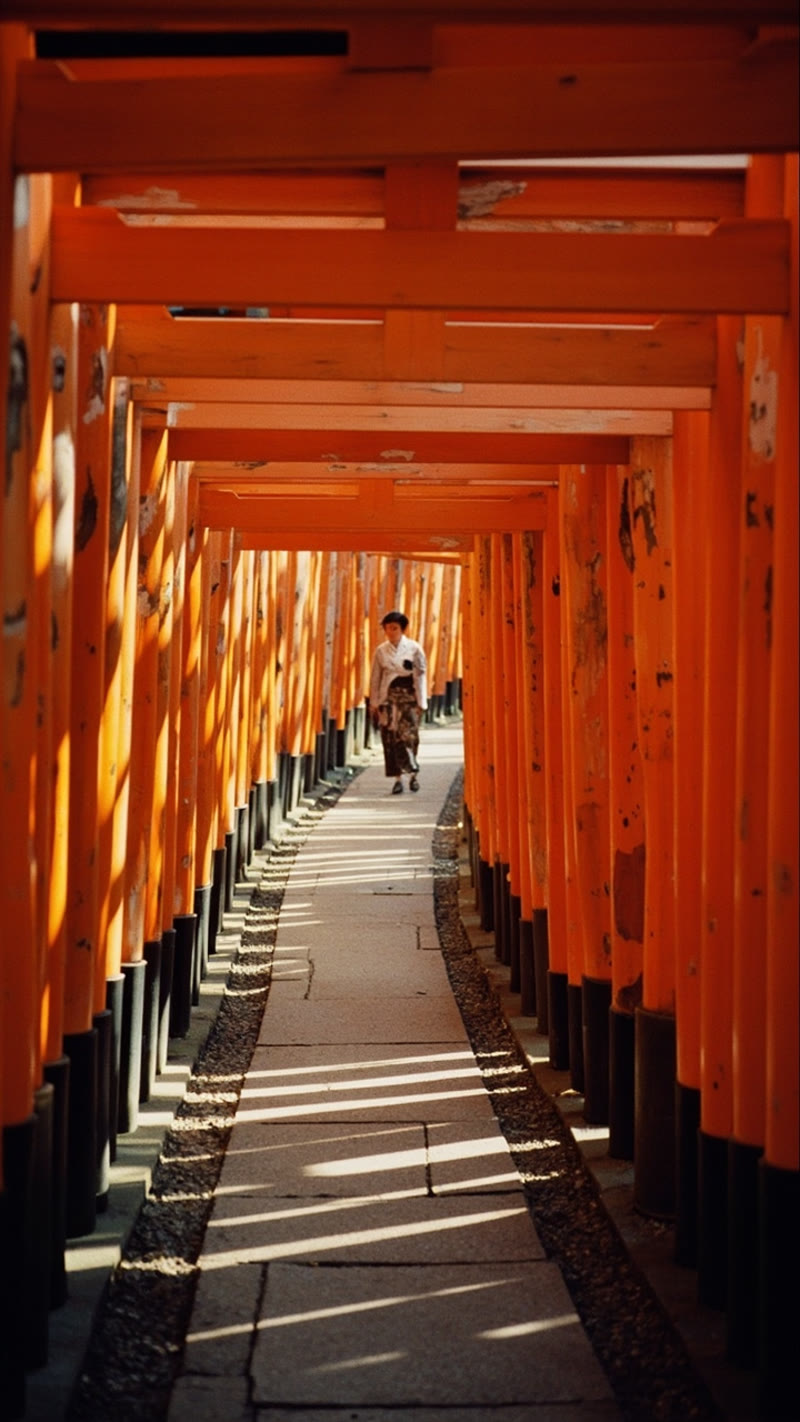
MiniMax — Best Color Science, Wrong POV
MiniMax produced the best color science of the three — warm, saturated orange that genuinely mimics Kodachrome's handling of warm tones. The dappled shadow pattern on the pathway is beautiful and era-appropriate. But it rendered a third-person view despite the first-person prompt, placing a figure in the center of the frame instead of shooting from behind her. It also produced the most "art-directed" composition — too symmetrical and deliberate for a casual 1970s snapshot.
What's good: Kodachrome-like warm color rendering. Organic grain structure (the best of the three). Nice light leak suggestion.
What's not: Ignored the first-person POV instruction. Composition is too polished and centered. Kanji is blurry and unreadable.
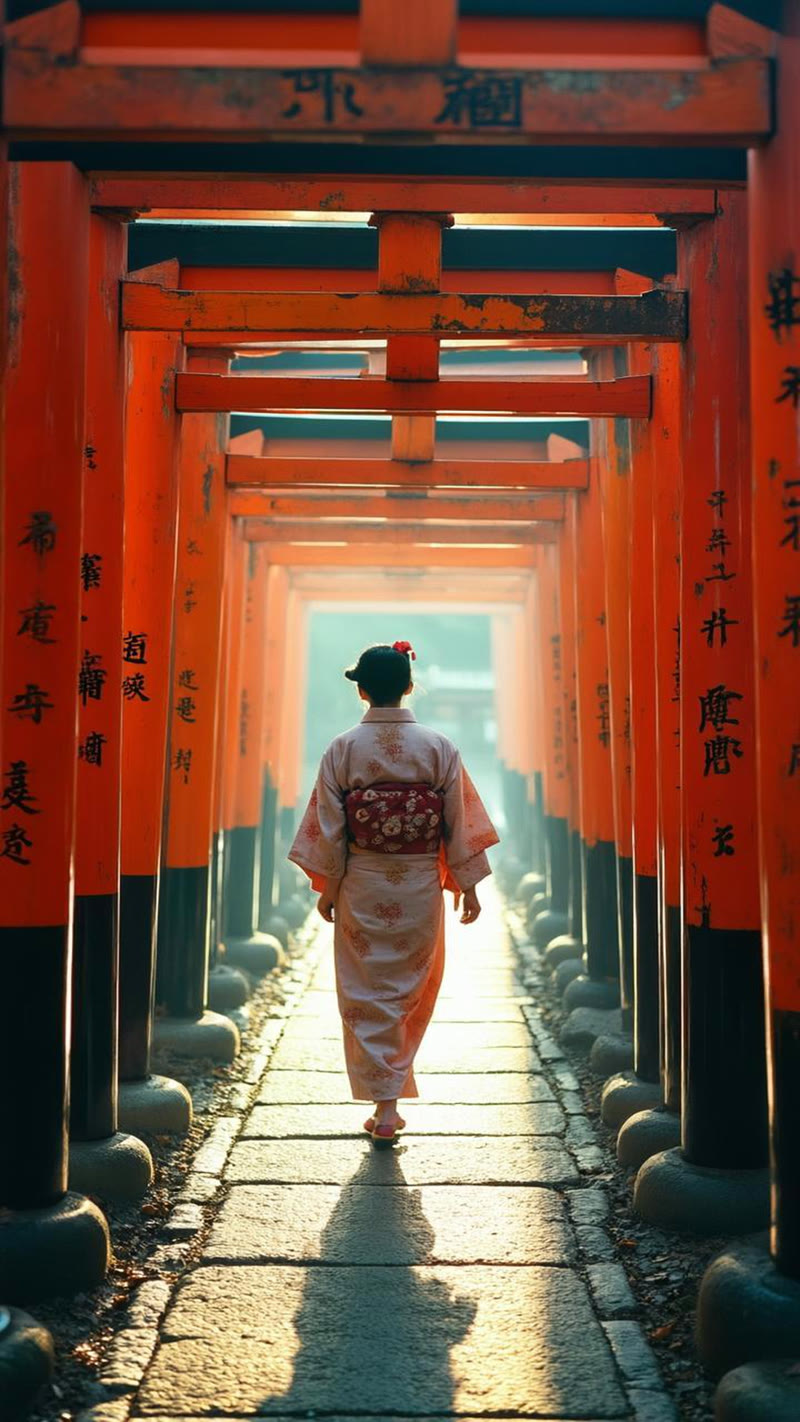
CogView-4 — Cinematic, Not Vintage
CogView-4 generated the most visually dramatic image — backlit haze, golden hour glow, a beautifully detailed kimono on the figure. But it's essentially a modern cinematic photograph with an orange-teal color grade (a very 2024 Instagram aesthetic). No film grain. No vintage character. The kanji on the pillars is garbled nonsense — the worst text rendering of any model.
What's good: Stunning atmosphere and lighting. Best figure rendering — the woman's kimono and obi are detailed and convincing. Strong emotional impact.
What's not: Completely failed the vintage brief. Garbled kanji. The orange-teal color grade is a modern tell. Mysterious stone objects line the pathway that don't exist at Fushimi Inari.
Test 2: Kinkaku-ji (Golden Pavilion)
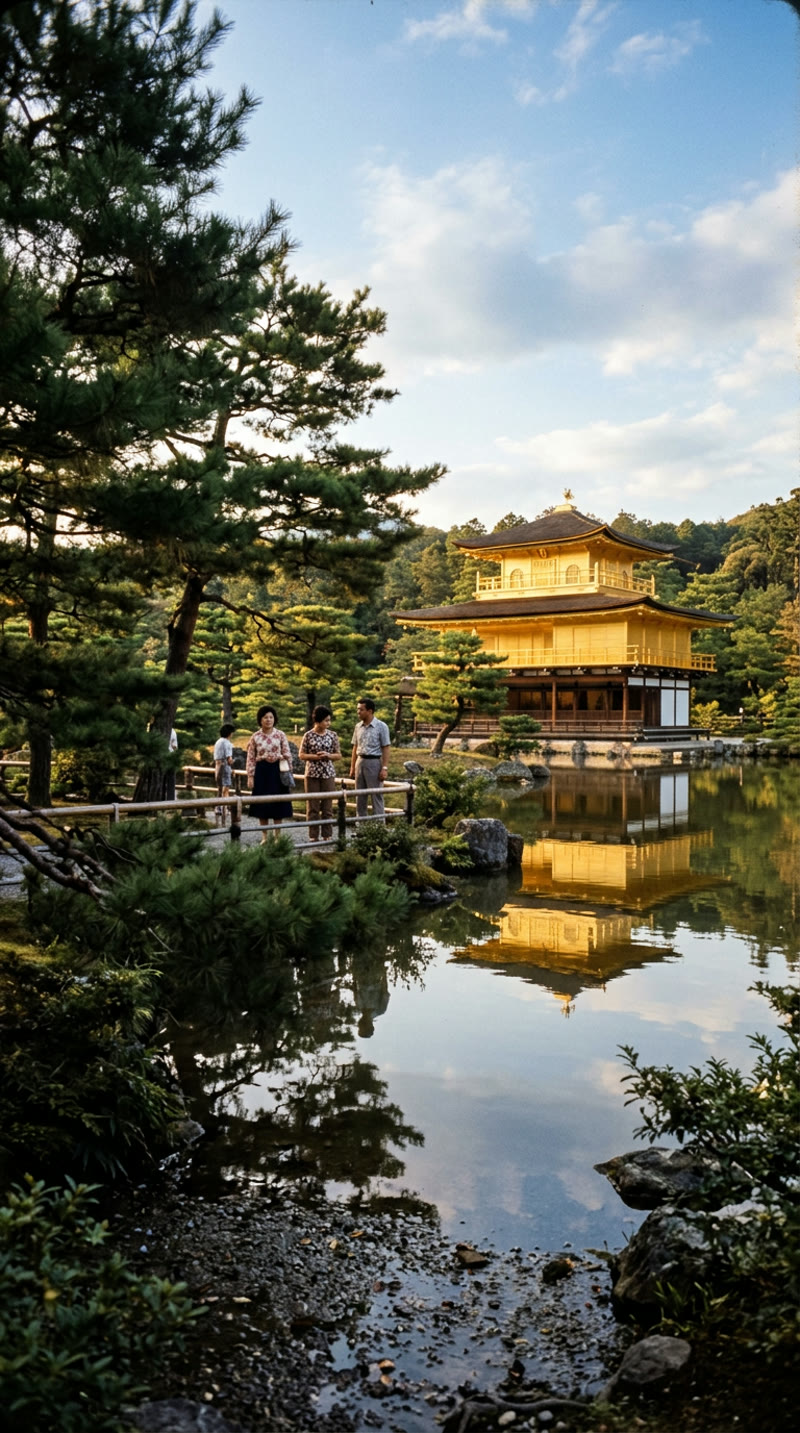
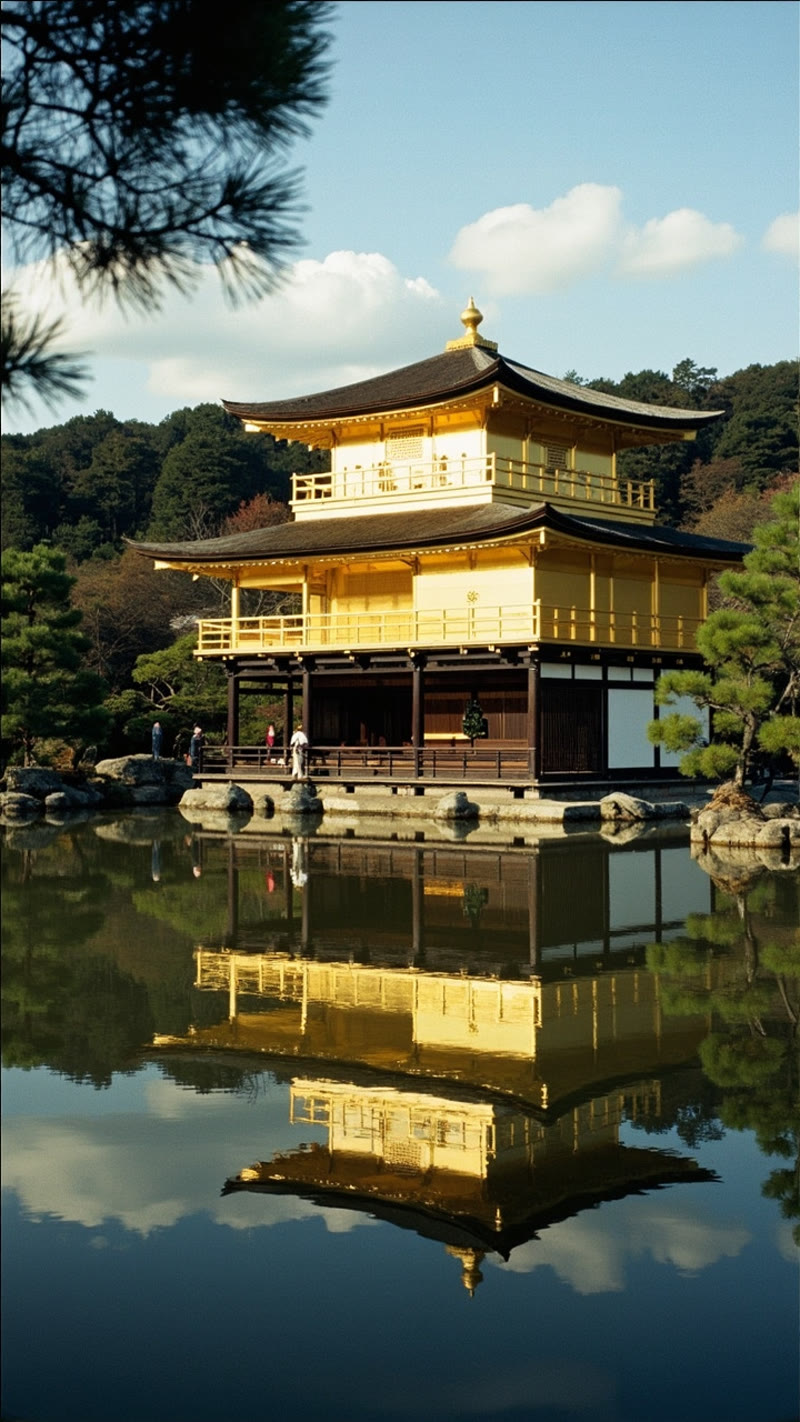
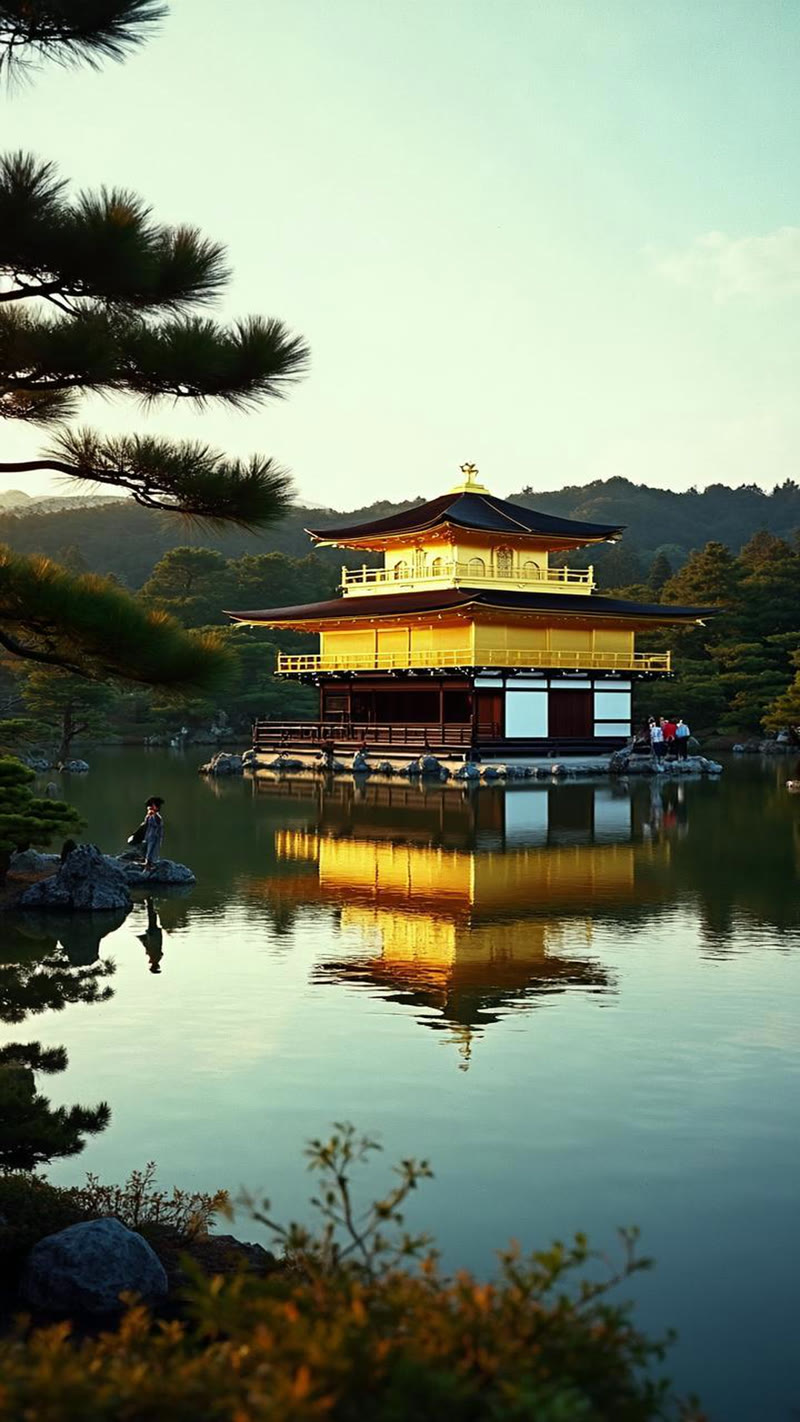
The prompt: A vintage photograph of Kinkaku-ji reflected in the mirror pond, shot on warm-tone film stock. Amateur composition, slightly off-center framing, the kind of photo from a 1972 Japan guidebook.
▶ Animated — Vintage POV Reel Clips
The pattern holds. Nano Banana 2 delivers the most convincing vintage feel — the gold of the pavilion has a muted, aged quality rather than the garish shine you'd see in a modern photo. MiniMax again nails the color warmth but produces a composition that feels more like a travel magazine cover than a tourist snapshot. CogView-4 renders a technically impressive image but with modern dynamic range and zero film character.
Test 3: Arashiyama Bamboo Grove
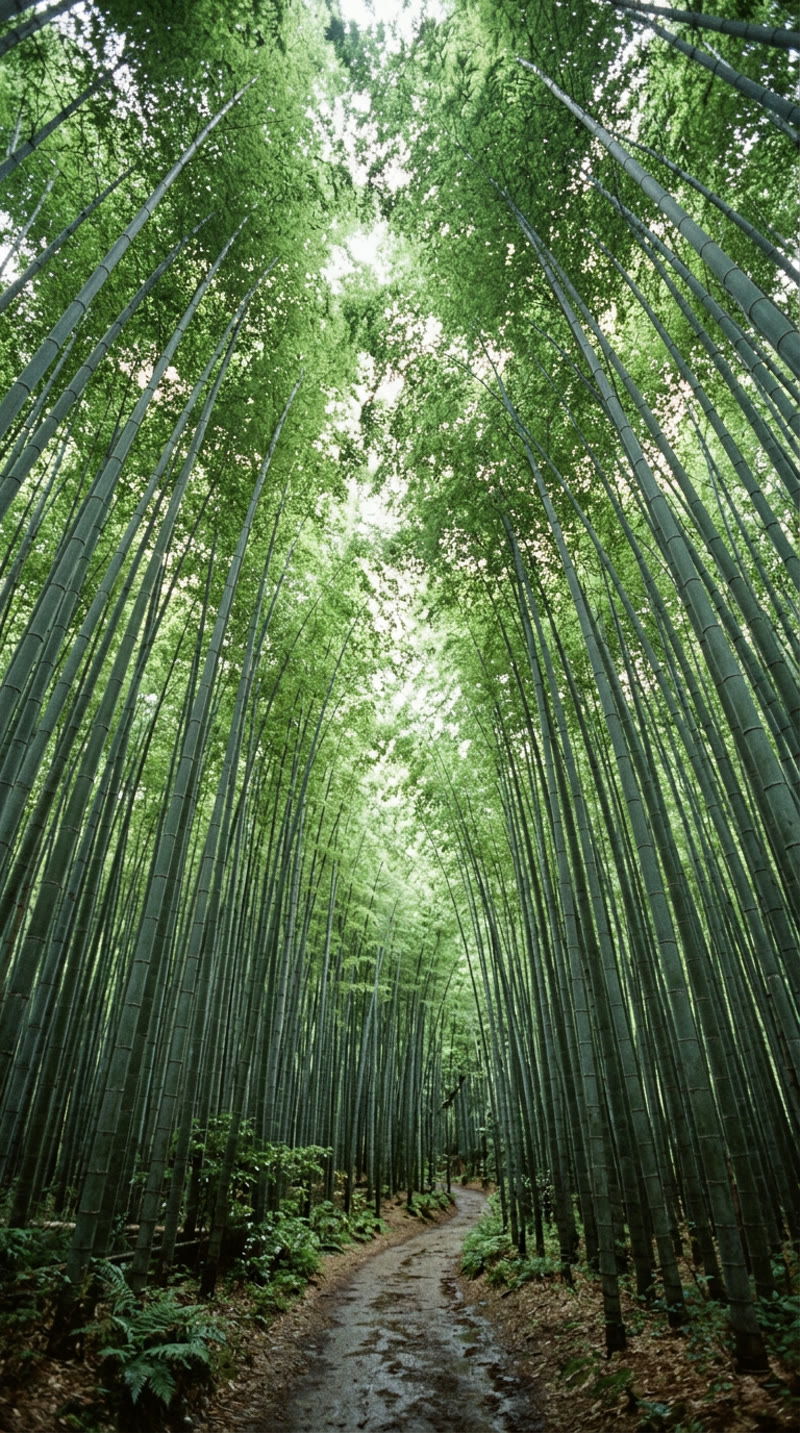
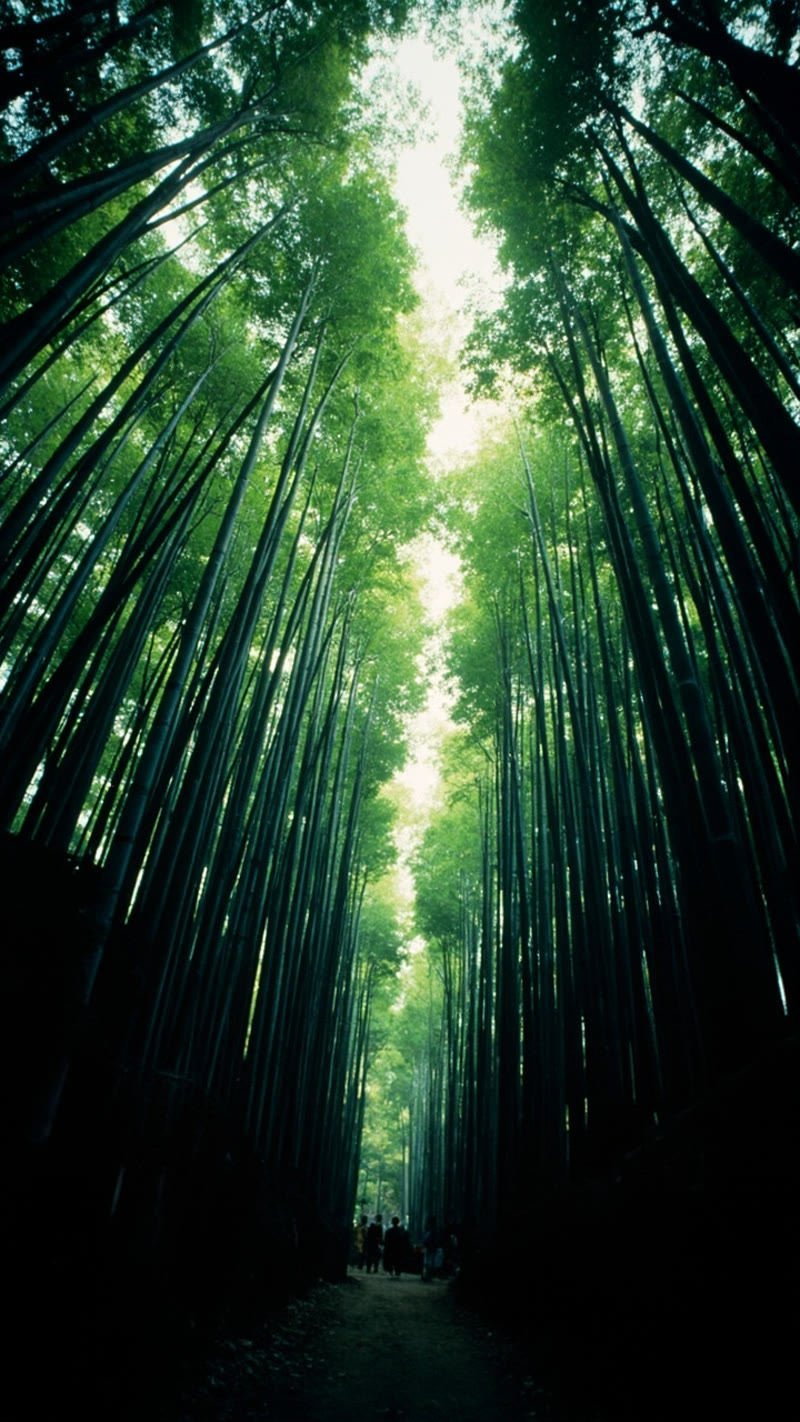
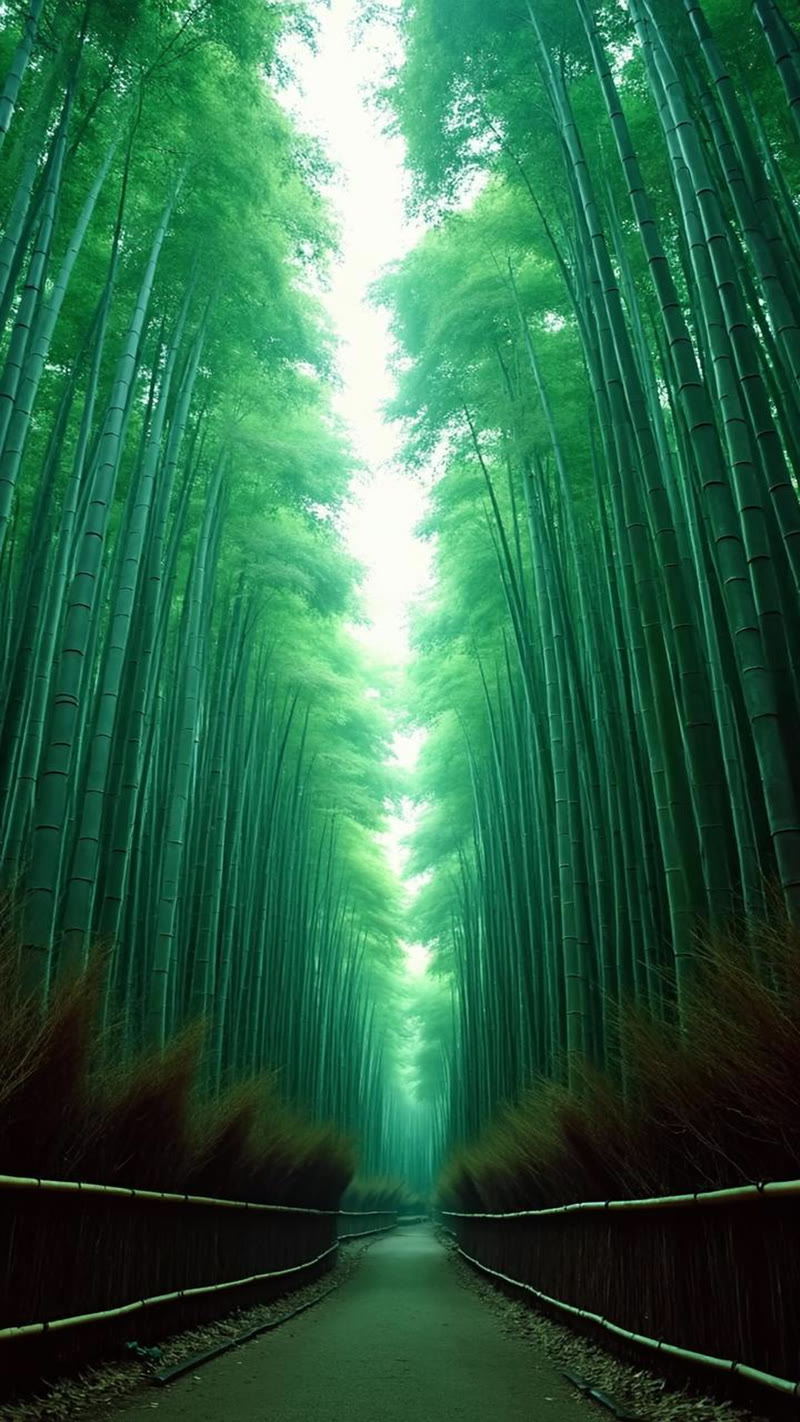
The prompt: A first-person photo walking through the Arashiyama bamboo forest, shot on 35mm film. Green tones should be slightly olive-shifted (characteristic of Kodachrome's green rendering). Include a figure ahead on the path.
▶ Animated — Vintage POV Reel Clips
This scene was the hardest for all three models. The bamboo grove requires very specific green rendering — Kodachrome famously shifted greens toward olive/sage rather than the vivid emerald that digital cameras produce. Nano Banana 2 got closest, with muted greens and a path that feels like a real forest trail. CogView-4 produced an image so saturated and cinematic it looks like a still from a video game.
Test 4: Gion Evening — The Black & White Test
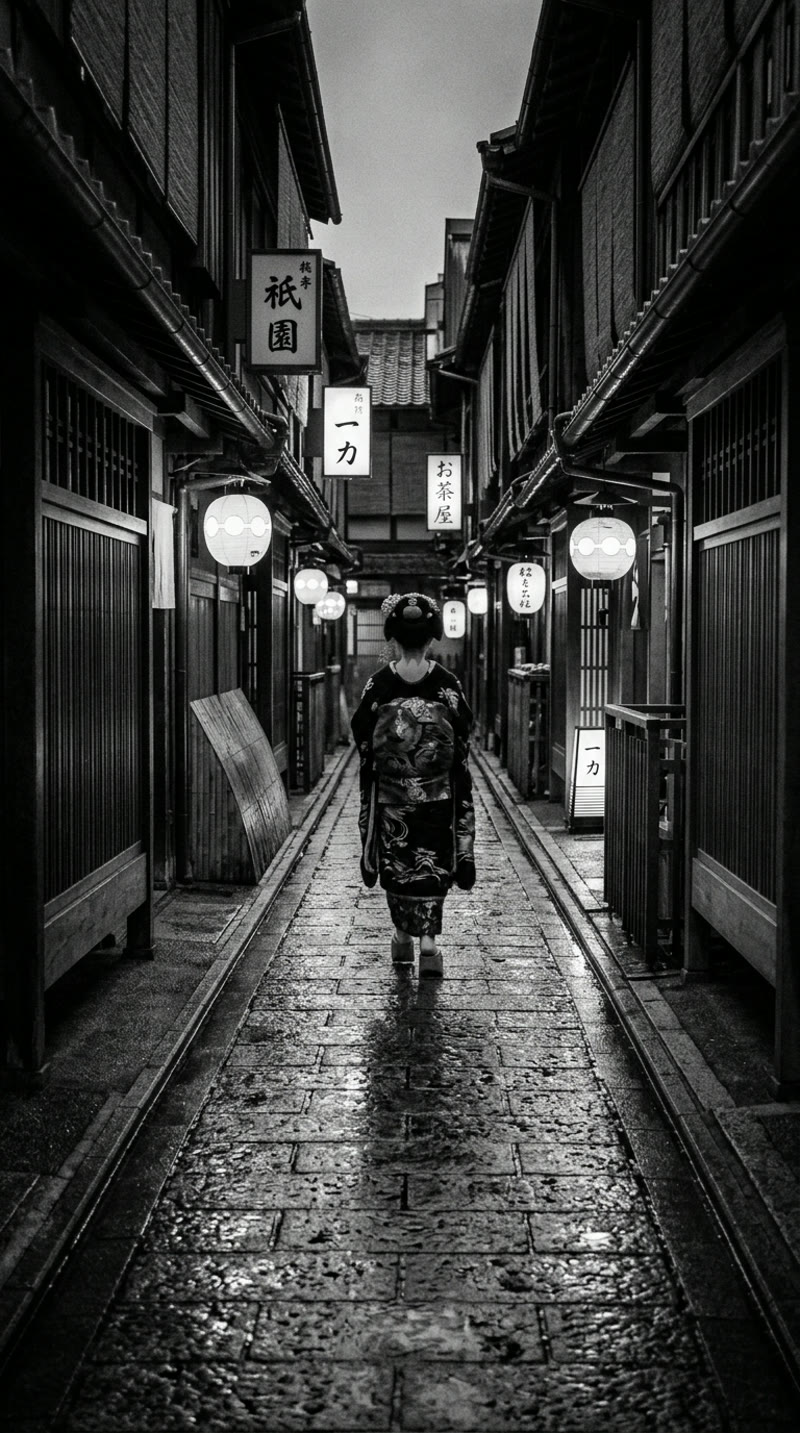
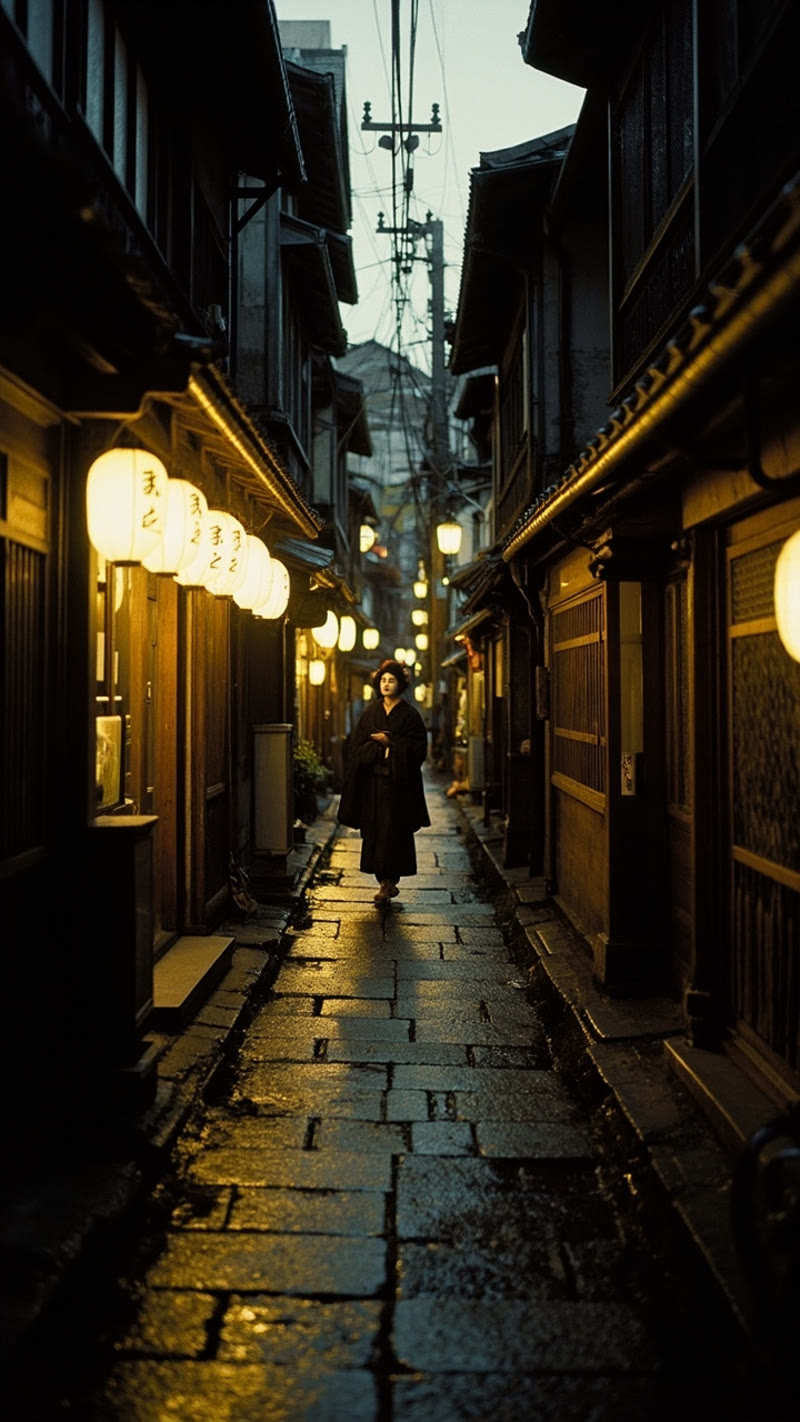
This was our most revealing test. We asked for "absolutely no color whatsoever, silver gelatin print" — a geisha walking through Gion's lantern-lit streets at dusk, shot on black and white film.
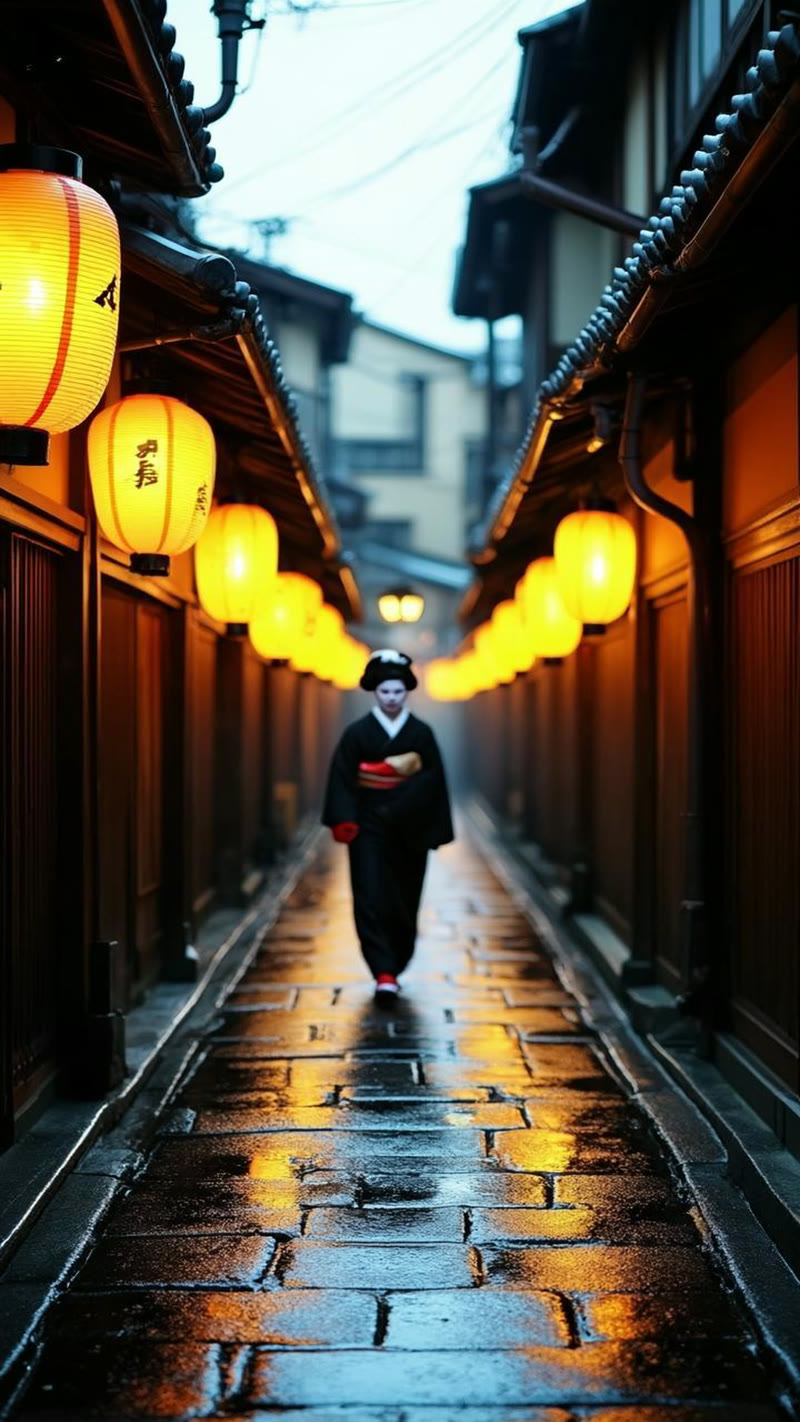
▶ Animated — Vintage POV Reel Clips
This test separated the models completely.
Nano Banana 2 delivered a stunning silver gelatin print. Pure monochrome, zero color bleed. Deep inky blacks in the machiya facades, luminous lantern highlights, visible grain consistent with Tri-X or Neopan film stock. The composition channels classic Japanese street photography — strong leading lines, the figure placed perfectly at the one-third mark. It's the kind of image you'd expect to find in a Daidō Moriyama photobook.
MiniMax completely ignored the B&W instruction. It produced a moody color photograph with warm amber lanterns and teal shadows. Attractive, sure — but not what we asked for. The prompt was explicit: "absolutely no color whatsoever." MiniMax rendered in full color anyway.
CogView-4 was the worst offender. Bright orange lanterns, vivid red accents on the figure's obi, warm orange pavement reflections. Not just "not black and white" — aggressively, blatantly colorful. The prompt was completely ignored.
This is the single most important finding from our test: Nano Banana 2 follows stylistic constraints faithfully. The other two models treat them as suggestions. If your workflow depends on the model doing what you ask — not what it "thinks looks good" — Nano Banana 2 is the only reliable option.
How Better Prompts Changed Everything
After the initial round, we rewrote our prompts with much more specific technical detail — what we call our "V2" prompts. The changes were significant:
- V1 (vague): "Shot on Kodachrome film, vintage feel"
- V2 (specific): "Describe the actual visual traits — warm saturated midtones, slightly cool shadows, limited dynamic range with clipped highlights and blocked shadows. Include scan artifacts: dust specks, hair, scratches. Amateur composition, slightly off-center. Chromatic aberration, lens softness at edges. No borders, no frame edges."
Here's the same Fushimi Inari prompt, V1 vs V2:
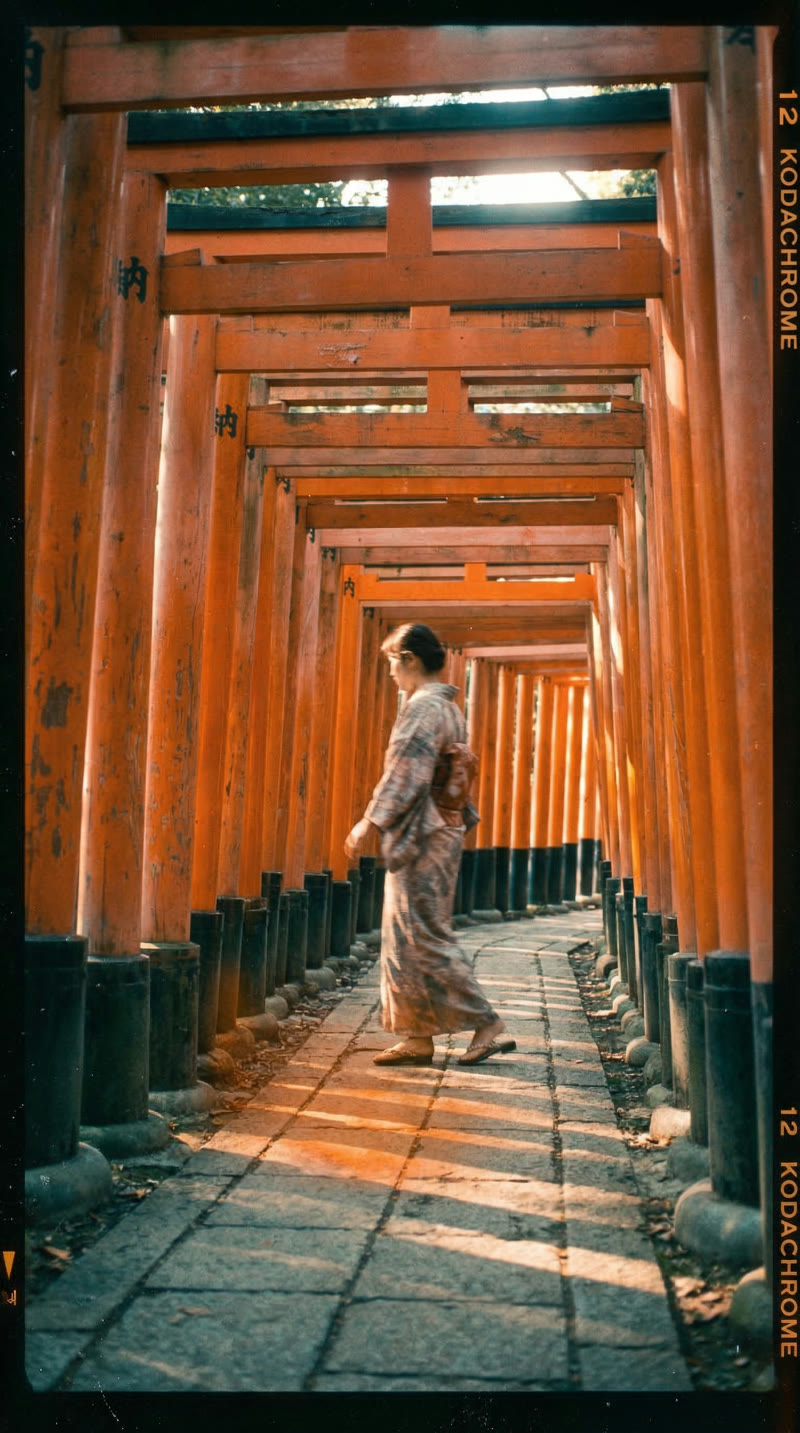
The V2 version is dramatically more convincing. Nano Banana 2 responded to the improved prompts by adding Kodachrome film rebate markings along the edge of the frame — "12 KODACHROME" printed in the characteristic orange-on-black typography, complete with frame numbers and orientation arrows. This isn't a generic "vintage overlay." These are technically accurate references to how actual Kodachrome slides look when scanned from their original mounts.
The grain also became exposure-dependent (clumping in shadows, finer in highlights) rather than uniform — exactly how real silver halide crystals behave on actual film.
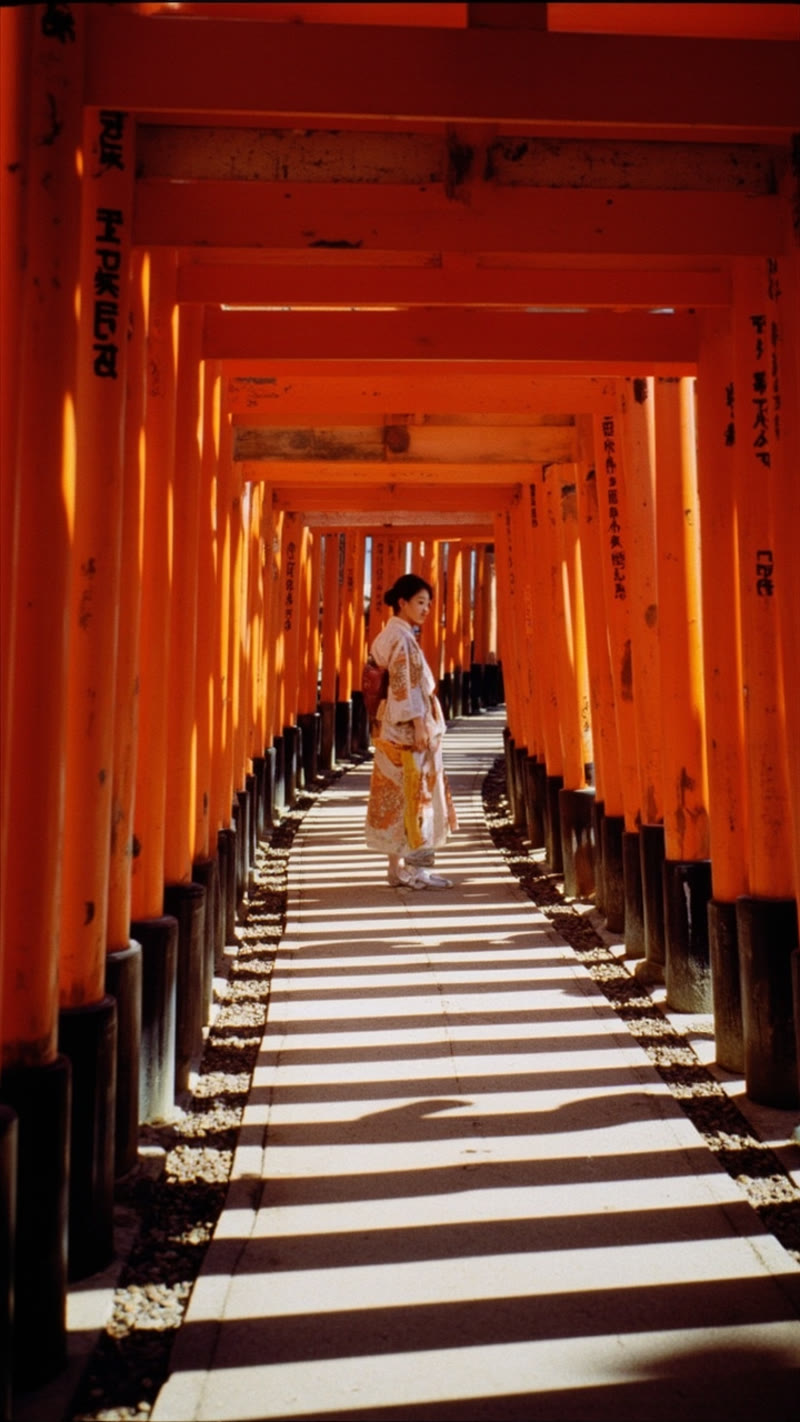
MiniMax improved moderately with V2 prompts — warmer tones, a subtle light leak, slightly more vintage character. But it couldn't produce the physical film artifacts (border markings, stock-specific text, scan lines) that V2 prompts requested. The model's strength lies in graphic visual impact and clean execution, not gritty period simulation. Better prompts made it warmer and moodier, but couldn't make it look like actual film.
The takeaway: prompt engineering unlocks Nano Banana 2's ceiling far more than the other models'. If you invest time in detailed, technically specific prompts, Nano Banana 2 rewards that investment exponentially. MiniMax improves incrementally. CogView-4 largely ignores the details.
Pricing Comparison
| Cost Factor | Nano Banana 2 | MiniMax image-01 | CogView-4 |
|---|---|---|---|
| Cost per image | ~$0.02 | ~$0.04 | ~$0.02 |
| Cost for 6 images (one reel) | ~$0.12 | ~$0.24 | ~$0.12 |
| Max resolution | Up to 4K | Up to 2K | 720×1440 |
| Free tier | Yes (Gemini API free tier) | Limited | Limited |
| Rate limits | Moderate | Moderate | Generous |
| API complexity | Moderate (Gemini SDK) | Simple REST | Simple REST |
Nano Banana 2 wins on price-to-quality ratio. It costs the same or less than CogView-4 while producing dramatically better results for our use case. MiniMax is roughly 2x the cost with no quality advantage for vintage photography.
Final Scorecard
| Category | Nano Banana 2 | MiniMax | CogView-4 |
|---|---|---|---|
| Vintage Authenticity | 9.5/10 | 5.5/10 | 2/10 |
| Film Grain / Texture | 7/10 | 7.5/10 | 3/10 |
| Color Science | 8.5/10 | 8/10 | 5/10 |
| Prompt Adherence | 9.5/10 | 5/10 | 2/10 |
| Japanese Text (Kanji) | 8/10 | 4/10 | 1.5/10 |
| Composition Quality | 8.5/10 | 7/10 | 7.5/10 |
| Architectural Accuracy | 9/10 | 6/10 | 5/10 |
| AI Artifact Avoidance | 8/10 | 7/10 | 4/10 |
| Prompt Engineering Ceiling | 10/10 | 5/10 | 3/10 |
| Price-to-Quality | 10/10 | 5/10 | 3/10 |
| Overall | 8.8/10 | 5.9/10 | 3.6/10 |
The Full Reels: Side by Side
Numbers and screenshots only tell part of the story. Here are the complete assembled Reels — the actual final output of our Vintage POV pipeline using Nano Banana 2 and MiniMax. Each Reel sequences all six Kyoto scenes with Remotion-rendered film grain, vignette, slow drift animation, and text overlays. This is what gets published to Instagram.
Both Reels use the same Remotion compositions (SlowDrift, LightLeak, ParallaxDepth, GentleSway, BreatheFocus, WarmFade) with identical text overlays and timing. The only difference is the source images. Notice how Nano Banana 2's vintage authenticity carries through to the animated version — the film grain and warm tones feel cohesive, while MiniMax's modern rendering creates a subtle disconnect with the vintage effects layer.
The Verdict
🏆 Winner: Nano Banana 2 (Google Gemini 3.1 Flash Image)
It wasn't close. Nano Banana 2 was the only model that consistently treated our stylistic constraints as instructions rather than suggestions. It produced the most authentic vintage imagery, the most accurate Japanese text, the best architectural detail, and it was the cheapest option.
The model's responsiveness to prompt engineering is its secret weapon. While MiniMax and CogView-4 plateaued quickly regardless of prompt quality, Nano Banana 2 kept getting better the more specific we got — eventually producing images with technically accurate Kodachrome film border markings that could fool analog photography enthusiasts.
🥈 Runner-Up: MiniMax image-01
MiniMax has real strengths — its color science is genuinely beautiful, with warm Kodachrome-like rendering that's the best of the three when it comes to organic grain texture. It produces visually striking, high-quality images that work well for social media content.
The problem is prompt adherence. It ignored our B&W instruction entirely, rendered third-person when we asked for first-person, and couldn't produce the physical film artifacts that V2 prompts requested. If your use case doesn't require strict stylistic control, MiniMax is a solid choice. For a production pipeline that depends on consistency, it's unreliable.
🥉 Third Place: Z.AI CogView-4
CogView-4 produces cinematic, visually dramatic images — but they always look modern. It defaulted to contemporary Instagram aesthetics (orange-teal grading, HDR dynamic range, backlit haze) regardless of what we asked for. The garbled kanji and invented architectural details are deal-breakers for any content involving Japanese subjects.
It might work for generic social media imagery where "looking cool" matters more than stylistic accuracy. For our use case, it was eliminated after the first round.
Which Should You Use?
Choose Nano Banana 2 if:
- You need images in a specific style and the model must follow your instructions
- You're building a content pipeline that requires consistency
- Your images involve non-English text (especially CJK characters)
- You want the best results from detailed, technical prompts
- Budget matters — it's the cheapest option with the best output
Choose MiniMax if:
- You want warm, colorful, visually striking images
- Exact stylistic control isn't critical
- You're generating travel/lifestyle content where "beautiful" is the main requirement
- You need organic, film-like grain texture
Choose CogView-4 if:
- You want dramatic, cinematic images with modern aesthetics
- Text accuracy doesn't matter
- Your content is in the "visually impressive but generic" category
- You need the cheapest possible option and don't mind inconsistent quality
How These Compare to the Broader Market
We tested three models, but the AI image generation ecosystem is much bigger. Here's how our findings map to the broader landscape of options available in 2026:
GPT Image Generation (OpenAI)
GPT-4o's native image generation and the newer gpt-oss-120b represent OpenAI's push into multimodal output. The GPT-4o pipeline excels at character consistency across multiple images and handles complex prompts well — similar to Nano Banana 2's strengths. However, GPT image generation tends toward a distinctive "clean digital" aesthetic that's harder to push into gritty, imperfect vintage territory. Pricing is higher per image due to input token and output tokens costs in the LLM pipeline. For prototyping and mockups, GPT's image capabilities are excellent; for production-grade stylistic work, Nano Banana 2 offers better value.
Midjourney & DALL·E
Midjourney remains the gold standard for artistic, high-quality image generation — its aesthetic sense is unmatched for certain use cases like concept art, anime, and fantasy illustration. DALL·E 3 (via OpenAI) handles text rendering surprisingly well but lacks an API for real-time integration into automated workflows. Neither offers the kind of fine-grained benchmarks or high-resolution control we needed for our Kodachrome simulation. If your workflow is manual (designer in the loop), Midjourney is hard to beat. If you need API-driven, real-world production automation, Nano Banana 2 wins.
Emerging Contenders
The open-source space is evolving fast. DeepSeek's multimodal models show promise for image understanding but aren't yet competitive for generation. Grok's image generation (via xAI) produces striking results but with limited stylistic control. Claude Sonnet (Anthropic) has emerging visual capabilities but focuses on analysis rather than generation. Chinese large language model providers like Qwen-Image (Alibaba) and GLM-based models from Zhipu AI (the team behind CogView-4) are rapidly improving — worth monitoring via web search for updated benchmarks.
For travel content specifically — where you need photorealistic output, accurate cultural details, correct non-English text, and high-fidelity vintage aesthetics at pixel-level precision — Nano Banana 2 is the strongest option we've found in the Google AI ecosystem and across the broader market.
What We Actually Use at tabiji
After this test, we standardized on Nano Banana 2 for all AI-generated travel photography. We dropped CogView-4 entirely, and while MiniMax stays in our toolkit for its color science strengths, Nano Banana 2 is the default for anything that requires stylistic precision.
The iteration cycle is fast: generate an image, review it, refine the prompt, regenerate. With latency under 15 seconds and costs under $0.02, rapid prototyping is cheap. We typically go through 2–3 prompt iterations per scene before settling on the final version — something that would cost 10x more with higher-priced models.
Our vintage POV Reels — which run twice daily across Instagram, YouTube Shorts, and Pinterest — exclusively use Nano Banana 2 with V2-optimized prompts. The total cost per Reel is about $0.15, including image generation, music, video rendering, and hosting. For infographics and destination comparison graphics, we use the same model with different prompt templates. At that price point, quality and reliability matter more than saving a penny per image.
If you're building AI-generated content at scale, invest your time in prompt engineering. The gap between a lazy prompt and a detailed one is bigger than the gap between models.
How to Use These Models (Code Examples)
If you want to try these models yourself, here's how to call each one. All three are accessible via simple API calls.
Nano Banana 2 (Google Gemini 3.1 Flash Image)
import google.generativeai as genai

genai.configure(api_key="YOUR_GEMINI_API_KEY")
model = genai.GenerativeModel("gemini-3.1-flash-image-preview")

response = model.generate_content(
    "A vintage 1970s Kodachrome photograph of Fushimi Inari torii gates. "
    "Warm saturated midtones, slightly cool shadows, limited dynamic range. "
    "Include scan artifacts: dust specks, scratches. Amateur composition.",
    generation_config=genai.GenerationConfig(
        response_modalities=["IMAGE", "TEXT"]
    )
)

# Save the image
for part in response.candidates[0].content.parts:
    if part.inline_data:
        with open("output.png", "wb") as f:
            f.write(part.inline_data.data)
MiniMax image-01
curl -X POST "https://api.minimax.chat/v1/image_generation" \
  -H "Authorization: Bearer YOUR_MINIMAX_KEY" \
  -H "Content-Type: application/json" \
  -d '{
    "model": "image-01",
    "prompt": "A vintage 1970s photograph of Fushimi Inari torii gates...",
    "aspect_ratio": "9:16",
    "response_format": "url"
  }'
CogView-4 (Z.AI)
curl -X POST "https://open.bigmodel.cn/api/paas/v4/images/generations" \
  -H "Authorization: Bearer YOUR_ZAI_KEY" \
  -H "Content-Type: application/json" \
  -d '{
    "model": "cogview-4-250304",
    "prompt": "A vintage 1970s photograph of Fushimi Inari torii gates...",
    "size": "720x1440"
  }'
For production use, we recommend starting with Google AI Studio (free tier includes Gemini image generation) and experimenting with detailed, technically specific prompts before scaling up.
Related Resources
- AI Video Generation Compared: Veo 3 vs MiniMax vs CogVideoX — our companion test of video models
- AI Music Generation Compared — testing music models for Reel soundtracks
- Sample Kyoto 5-Day Itinerary — see how we use AI-generated content in real itineraries
- All Resources — more travel tech comparisons and guides
All images in this comparison were generated from identical prompts on the same day (March 10, 2026). No post-processing was applied. The images shown are direct outputs from each model's API.